The agent cloud: what changes when your users are agents
Agents flip the cloud from one app serving millions of people to millions of agents each running their own app. Here's what changes in the stack, and why isolation and state matter most.
For about fifteen years the cloud was built around one idea: one app, lots of people. You write the code once, run it on a fleet of identical servers, and the whole stack exists to push more human requests through fewer machines.
Agents flip that around. Now it's millions of agents, each running its own little app, and a lot of that code was written by a model a few seconds ago. Jamin Ball laid this out well in a recent Clouded Judgement post on the agent cloud (opens in a new tab), and it's worth unpacking, because it changes what you should expect from the computer your agents run on.
This post walks through what changed, what the new layers of the stack actually do, and the two ideas that matter most when you're picking where agent code runs: isolation and state.
The cloud we built for apps
If you launched a SaaS product in the early 2010s, your cloud bill had four main lines on it:
- Virtual servers to run the app
- Object storage for files
- A managed database
- A load balancer out front
That bundle fit the job. The app servers didn't hold any state of their own, so you could run ten copies or a hundred and it didn't matter which one answered. Anything worth keeping went in the database. Servers stayed up around the clock.
Containers and serverless came later and changed the packaging, but not the goal: keep the machines busy and get the most requests out of every core you pay for. The key word is utilization.
What's different about an agent workload
An agent doesn't behave like a web app. It's closer to a developer who sits down at a fresh laptop, does one job, and leaves. Five things change:
- The code is untrusted. Much of what an agent runs was written by a model moments earlier, and nobody reviewed it. You have to assume it could do something dumb, or something worse.
- Every task wants its own machine. If you can't trust the code, you can't let two tasks share a box. One task, one isolated computer.
- Lifetimes are all over the place. A task might take three seconds or three days. There's no "always on" to plan around.
- Demand shows up in bursts. One request can fan out into hundreds of parallel attempts, then go quiet.
- Work has to survive a pause. Agents wait on people, on tools and on other agents. They need to stop, pick up where they left off, and sometimes branch into several attempts from the same starting point.
So what you optimize for changes. The old cloud asked how many requests it could squeeze onto a core. The agent cloud asks how fast it can hand a task a clean, safe machine, and how cheaply it can keep that task's work around.
The agent cloud, layer by layer
Most of the old building blocks have a counterpart in the agent cloud. They do a similar job, but for a very different user. A couple of layers are brand new. Here's how they map, plus the question worth asking any vendor at each layer.
| Classic cloud | Agent cloud | What it does | Question to ask |
|---|---|---|---|
| Virtual server | Sandbox | A disposable, isolated computer for each agent task | What separates my sandbox from the host and the tenant next door? |
| Object storage | Persistent state | Storage that outlives the task, so work can be paused, snapshotted and forked | Can I snapshot an environment and start copies from it? |
| (new) | Inference | Runs the models that do the thinking | Which models, and where does my data go? |
| Load balancer | Model router | Sends each request to the right model for the job, not just the next free server | How does it handle fallbacks and cost limits? |
| (new) | Training loops | Environments and evals that turn open-weight models into your own | Can the same sandboxes double as training environments? |
| Datacenter hardware | Compute, storage, network | The physical floor everything else runs on | Where does it physically run, and can it run on my hardware? |
Around that core, a second ring is forming: durable workflows that survive crashes, browsers agents can drive, CI compute for all the code agents write, source control that can absorb a flood of commits, identity and payments for agents, observability at agent scale, and memory stores.
One layer doesn't shrink: the bottom row. Every agent task needs its own machine, so there are a lot more machines, and the floor gets bigger.
Isolation: why a container isn't enough
Containers are great for code you wrote and trust. Every container on a host shares the host's kernel, the core of the operating system. That's what makes containers light and fast. It's also the weak spot: one kernel bug can be a way out, and model-written code is exactly the kind of thing you don't want poking around for one.
A microVM gives each task its own small Linux kernel behind hardware virtualization. To reach the host or a neighbor, code has to get through the CPU's virtualization boundary, not just a shared kernel. MicroVMs used to cost you startup time. Purpose-built VMMs like Firecracker changed that by booting only what a short-lived job needs.
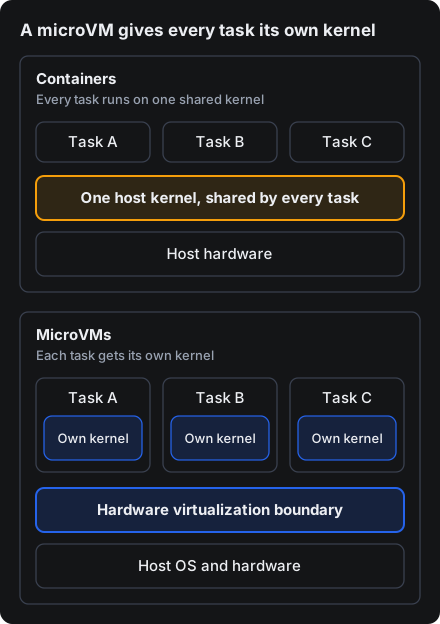
With containers, one kernel stands between every task and the host. With microVMs, each task brings its own kernel, and the boundary is enforced by the CPU.
When you look at sandbox options, check for three things:
- A kernel per sandbox, not one shared kernel
- Outbound network off by default, so a task only reaches what you allow
- A hard time limit, so a stuck task doesn't run (and bill) forever
State: snapshot and fork
The second big idea is state. For an agent, the environment is the work: the repo it cloned, the packages it installed, the files it wrote. If that disappears every time a task ends, you pay to rebuild it every time.
Two operations matter:
- Snapshot. Freeze an environment at a point in time, like a save point in a game.
- Fork. Start several new sandboxes from one snapshot. Five attempts at a problem all start from the same setup instead of installing everything five times.
What makes this cheap is copy-on-write. On a copy-on-write filesystem like ZFS, a snapshot doesn't copy your data. It marks a point in time. A copy made from it shares every block with the original and only stores what it changes. So ten copies of a 10 GB environment don't cost 100 GB. They cost 10 GB plus whatever each one writes.
Where Triton fits
We don't build every layer of the agent cloud, and we're not trying to. Triton Cloud is the floor, plus the two things on top of it that matter most for agents: sandboxes and state.
- A microVM per task. Every sandbox has its own Linux kernel and a hardware virtualization boundary between it and the host and other tenants. We're building our sandboxes around Firehyve, our Rust microVM for illumos bhyve.
- Snapshot and fork. Set an environment up once, snapshot it, then fork copies for parallel runs. Triton Cloud runs on illumos and ZFS, the copy-on-write filesystem from the section above.
- Guardrails on by default. Outbound network access is denied until you allow it. Every sandbox can have a lifetime and a deadline action (delete, stop, or pause where enabled), so stuck tasks clean up after themselves.
- Our cloud or yours. Sandboxes, VMs and private networking run under one control plane, in our cloud or on servers you own. That matters when the code your agents run touches data that can't leave your building.
- Easy to drive. Create, exec, snapshot and fork by API and
tritonctl, then watch it all in the console with a terminal, processes, logs and snapshots.
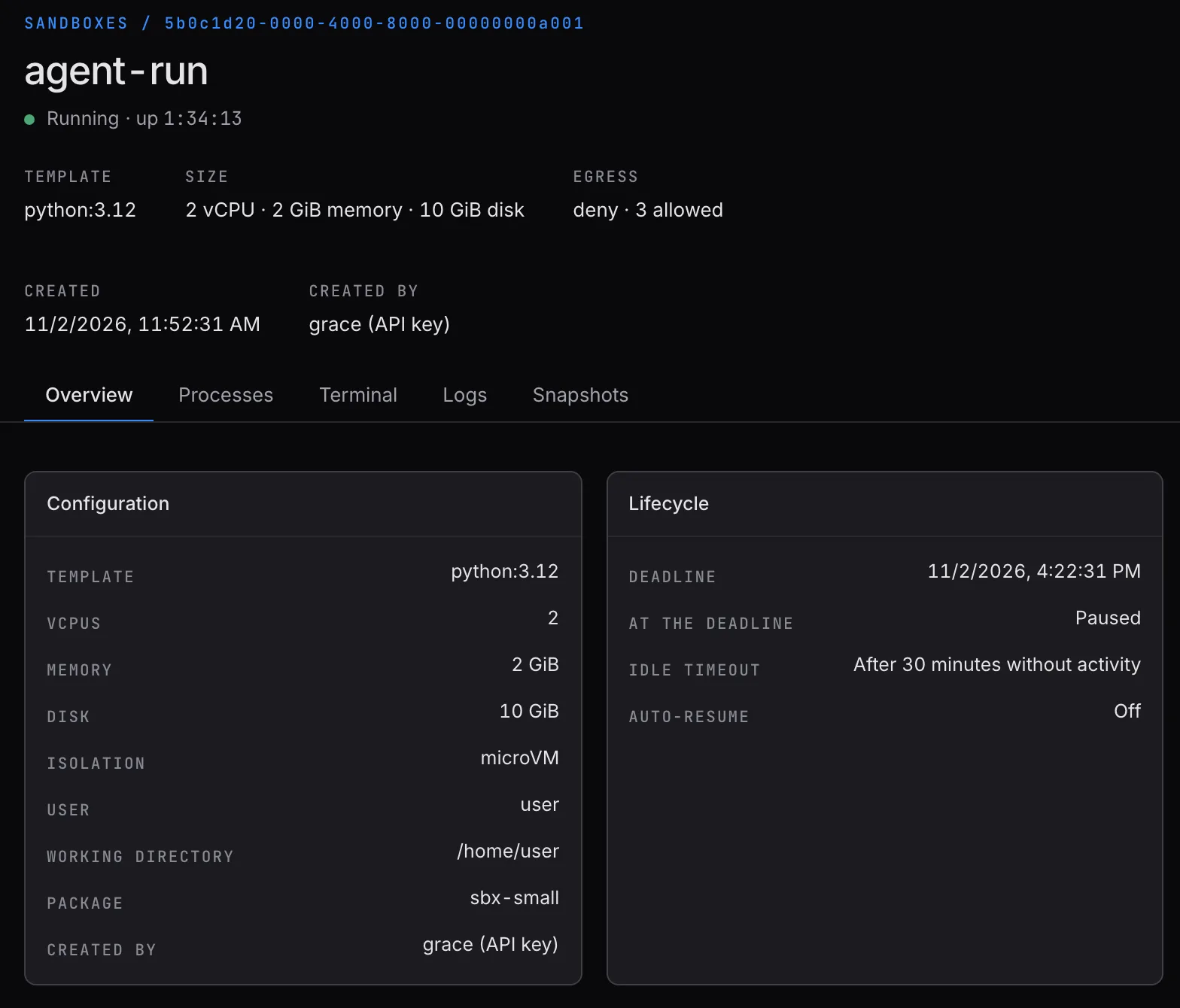
Here's the whole loop from the command line:
tritonctl sandbox create --name dev --package sandbox-4g --ttl 1htritonctl sandbox exec dev -- python agent_task.pytritonctl sandbox snapshot create dev --name readytritonctl sandbox fork dev --count 5 --from-snapshot readytritonctl sandbox delete -y dev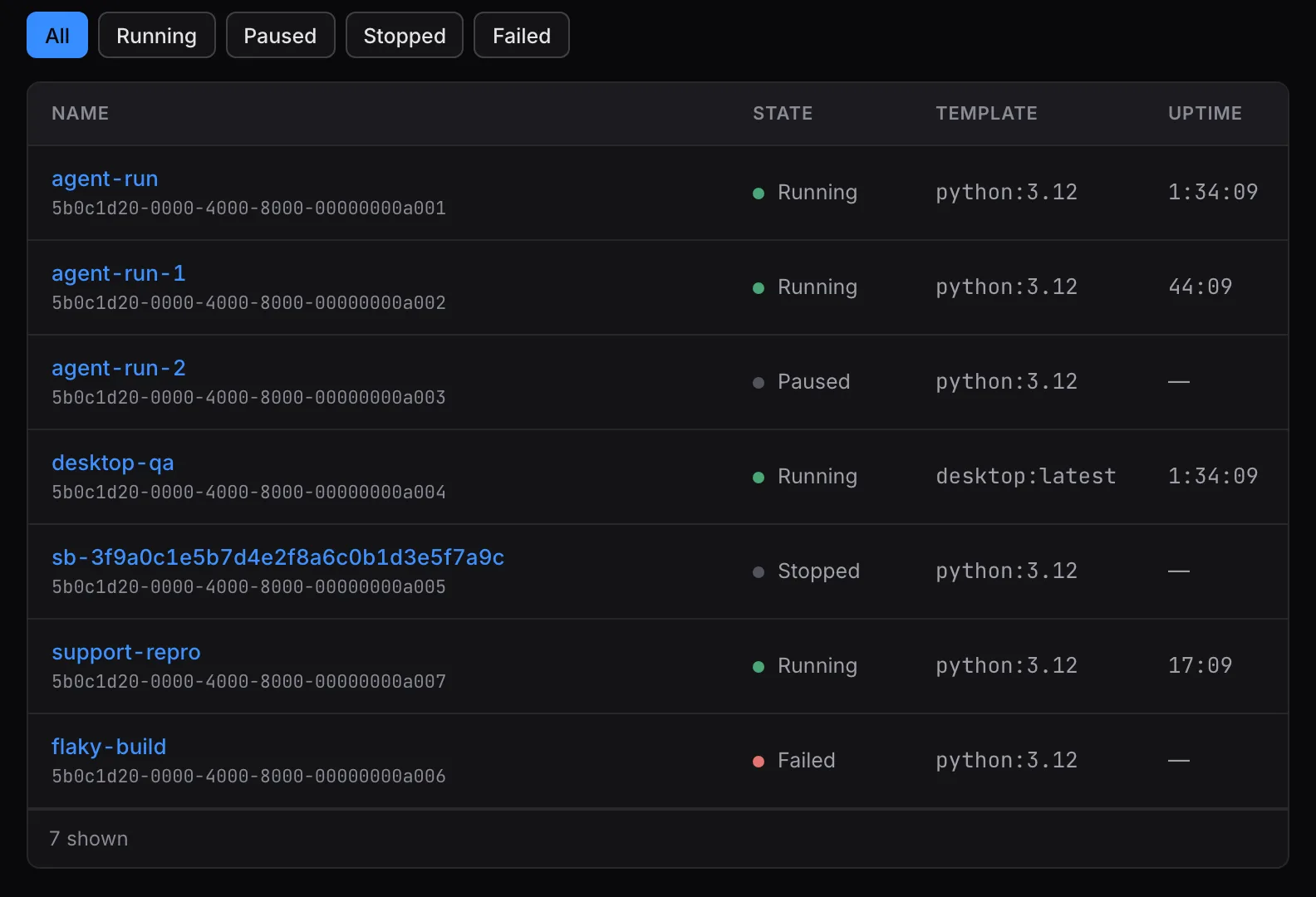
Inference, model routing and training loops run on top of that. Bring whatever models and frameworks you like. Your agents' code still needs somewhere safe to run.
Why the floor matters more now
It's easy to think of agents as a model story. But every agent task ends up as code running on a real computer somewhere, and there are going to be far more of those computers than there ever were web servers.
That's why we think the boring layer (compute, storage and network) gets a lot more interesting from here. Building agents and want to see what running them on Triton looks like? Talk to an engineer.