Firehyve: a bhyve microVM for agent sandboxes
A Rust VMM for illumos bhyve that boots a Linux guest in about 65 ms. Where it came from, its performance, and where it's going.
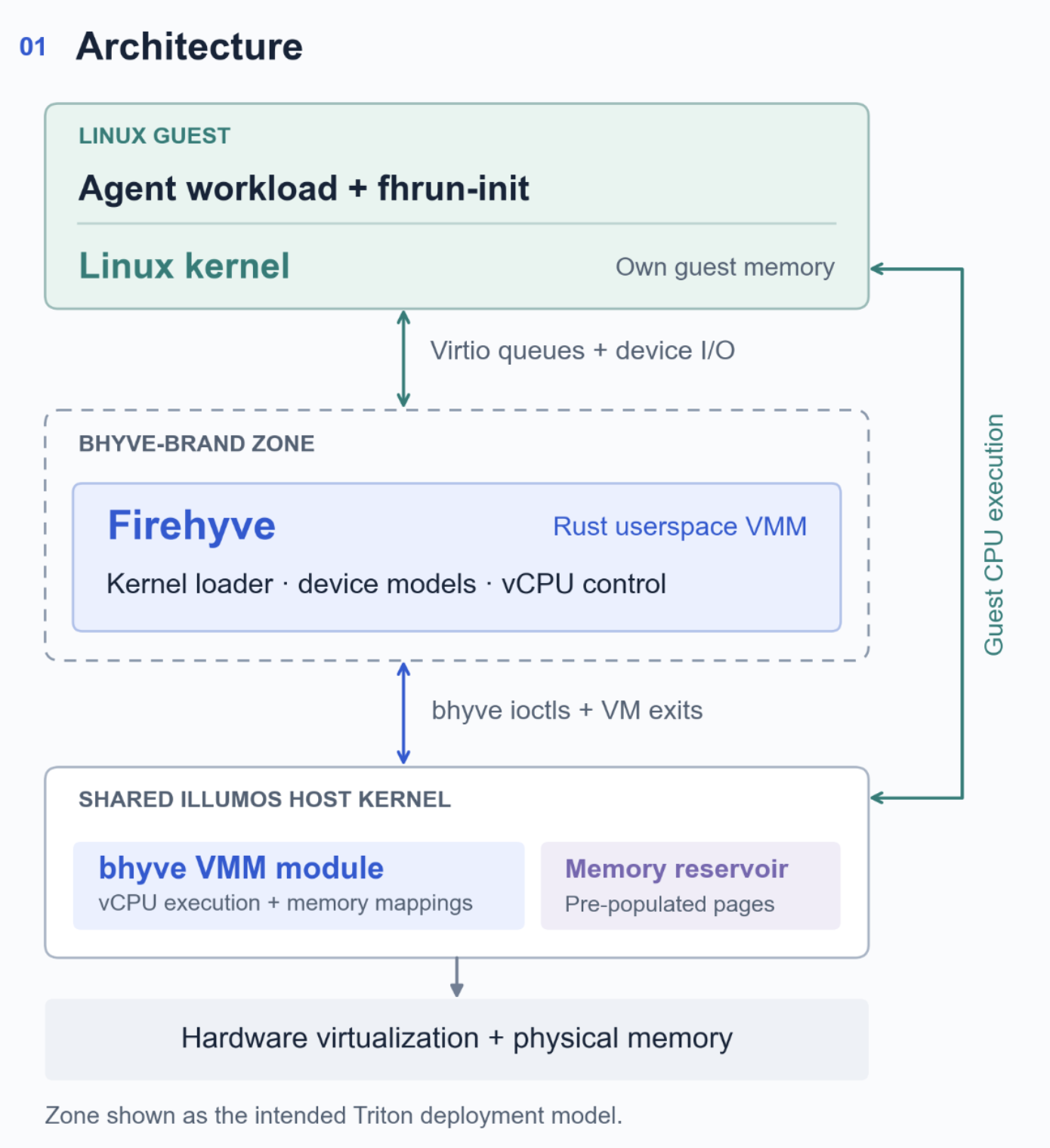
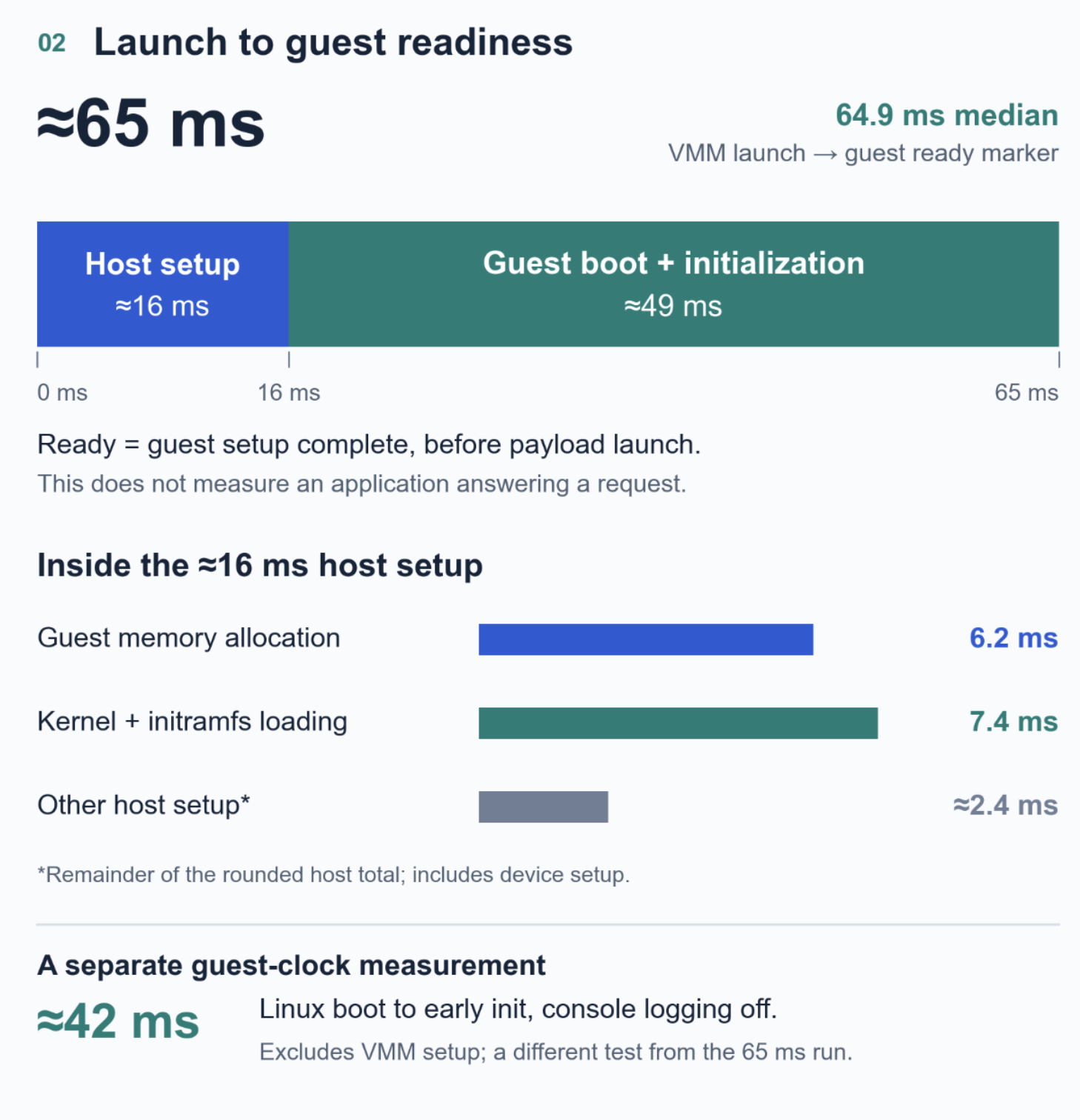
Firehyve is a virtual machine monitor (VMM) for illumos bhyve, written in Rust, that boots a Linux kernel directly with no firmware and no bootloader and presents only the devices a short-lived workload needs (inspired by Firecracker). On a SmartOS compute node, a single-vCPU, 128 MiB guest reaches its ready marker 64.9 ms after the VMM process starts, and it is the microVM we are building Triton Cloud's agent sandboxes around.
Why I wanted Firehyve
Triton has run Linux containers on SmartOS through LX-branded zones for a decade. A Linux binary executes against the illumos kernel through a syscall translation layer, which gives us fast startup and high density without a second kernel per container.
LX zones also gives us compatibility problems that get worse over time. We don't see it too often where a new issue pops up, but it does happen, and every newer Linux interface an application comes to depend on has to be reimplemented in the translation layer, and once workloads started assuming io_uring, eBPF and newer cgroup semantics, keeping up isn't always possible.
So I started firehyve as a proof of concept. Initially, I had a crazy idea that I wanted to run any linux process as a proces on smartos, just wrapped in a microVM. And it turned out to work better than I expected, and faster than I expected.
So I set my sights on something in the same region.. I wanted to give LX like workloads a Linux kernel of their own while keeping startup fast enough that nobody would miss the zone, and to keep hot-plug of CPU, RAM and disk and even VirtIO FS for passthru to ZFS.. I came up with Firehyve.
And then AI agents arrived and seemed like exactly that shape of thing. A fast-booting microVM with a real kernel is a solid foundation for that, and SmartOS zones add containment around the VMM process itself.
What does Firehyve do today?
Firehyve is written in rust; supports booting around 100 instances per second in our test environment. Has the following capabilities :
- Hot plug CPU/Disk/RAM
- virtio: blk, net (viona), rng, fs, console, vsock
- Direct kernel boot for Linux instances
Where to start and stop the clock
The first question I had to settle was, how fast can the illumos VMM boot a virtual machine? And it turns out, it's pretty fast.
For the guest kernel alone, I measure inside the guest through early init. With serial console logging enabled, the tested kernel reached init in about 172 ms. With it disabled, that fell to about 42 ms. This interval excludes everything the VMM does before the guest starts.
For the broader question, how long from launch until the workload can run, the host starts its timer when it forks the VMM process. It stops when fhrun-init, the guest's PID 1, writes a ready marker after filesystem setup and configuration of any declared network interfaces, immediately before launching the workload.
The results
Everything below came from a single SmartOS compute node with an Intel Xeon Gold 6240 at 2.6 GHz. Each guest had one vCPU and 128 MiB of memory, supplied from a pre-populated VMM memory reservoir. The kernel was Linux 6.12.13 built from tinyconfig, without SMP, EFI or loadable modules. I ran 20 boots per configuration and destroyed the VM between boots.
| Kernel image | Minimum | Median | Maximum |
|---|---|---|---|
| Compressed bzImage | 91.5 ms | 105.5 ms | 119.8 ms |
| Uncompressed PVH ELF | 61.4 ms | 64.9 ms | 78.3 ms |
The host showed roughly 10 ms of drift across repeated batches, so read the medians with that in mind. These results characterise this configuration on this host, not the platform.
For the 65 ms configuration, the VMM's phase logs put host-side setup at about 16 ms, leaving roughly 49 ms for the guest kernel to boot and initialise through the ready marker.
What moved the number
Four changes account for most of the startup time. None of them is novel. All of them turned out to be large enough to dominate everything else I tried.
Entering the kernel through PVH. A compressed bzImage decompresses itself during boot. The PVH boot ABI lets the VMM enter an uncompressed ELF kernel directly in 32-bit protected mode, and building Linux with CONFIG_PVH=y supplies the entry-point information the loader needs. That path reduced the median by about 40 ms.
Loading the image without a staging buffer. This one took more investigation. The original loader read the kernel into a staging buffer, then copied it into guest memory with a byte-at-a-time store loop. Loading the 9.34 MiB PVH image took 22.4 ms.
| Loading method | Total load time |
|---|---|
| Read into a staging buffer, then byte-at-a-time stores | 22.4 ms |
| Read into a staging buffer, then memcpy | 22.4 ms |
| Map the file, then memcpy | 14.8 ms |
| Map the headers, then pread directly into guest memory | 7.4 ms |
Taking memory from the reservoir. illumos provides a host-wide reservoir of wired pages that an operator can populate before launching VMs, and a VM created with VCF_RESERVOIR_MEM draws its memory from that pool instead of faulting and zeroing pages during creation. In a separate test with a 512 MiB guest, three runs per configuration gave median VM-creation times of 221 ms without the reservoir and 19 ms with it, about an 11.6-fold improvement, with guest-side boot time essentially unchanged.
Keeping the console off the boot path. Console logging was another substantial cost, which is why I kept the guest kernel's serial console disabled during the fast-boot tests.
Booting 600 at once
I also measured concurrent startup times. The harness launched each batch as close together as it could, then timed how long it took for the last guest to report ready. Each guest had 128 MiB, and the reservoir was sized for the batch.
| Guests launched | All guests ready | Successful boots |
|---|---|---|
| 100 | 1.10 s | 100/100 |
| 200 | 2.20 s | 200/200 |
| 400 | 5.00 s | 400/400 |
| 600 | 9.29 s | 600/600 |
These were boot-concurrency results with idle guests on in a 72 vCPU server. They say nothing about how many active builds, test suites or agent sessions the host can sustain.
Zones around the VMM
For the Triton deployment, the VMM is intended to run inside a zone. The guest has its own Linux kernel, and the zone confines what the userspace VMM can reach on the host.
That adds containment if an attacker compromises the device model. The VMM process stays subject to the zone's filesystem, process, networking, device and resource restrictions.
Where this is going
We are building firehyve into the Triton Cloud Agent Sandbox solution and developing the same capability for private deployments on SmartOS. Firehyve's source is available under MPL-2.0 in the TritonDataCenter/rshyve repository (opens in a new tab), where Firehyve is the microVM binary alongside the broader rshyve VMM and fhrun. If you want to evaluate it for your workloads or discuss an early pilot, get in touch.