New images to run your favorite applications on Triton bare metal infrastructure containers
Today we are releasing some brand new images available for use in private data centers powered by Triton and in the Joyent public cloud. These images run on Triton infrast
By Christopher Horrell ·
Today we are releasing some brand new images available for use in private data centers powered by Triton and in the Joyent public cloud. These images run on Triton infrastructure containers, which are like VMs, but run with the high performance and low latency that's only available on bare metal. That bare metal performance is made possible by Joyent's secure container hypervisor that's at the center of our Docker container, infrastructure container, and hardware virtual machine compute offerings. Containerized applications enjoy better performance, and data centers running Triton containers deliver more compute power on fewer physical servers, reducing costs and energy consumption.
The new images, available now on images.joyent.com and the Joyent Public Cloud, are based on Ubuntu 14.04 image and offer common applications and environments, including Node.js, MongoDB, PostgreSQL, and Percona Server. Infrastructure containers running these images enjoy the benefits of the Triton platform, including highly performant and reliable ZFS filesystems, native access to DTrace for debugging and performance analysis, and live-resizing to add capacity (CPU, memory, and storage) without downtime as needs your needs grow.
Comparing infrastructure containers to Docker containers and hardware virtual machines
Infrastructure containers offer the advantages of Triton's bare metal container infrustructure without any added complexity to containerize applications.
On Triton:Docker containersInfrastructure containersHardware virtual machinesRun your Linux distribution of choice1YesYesYesProvide all the services of a typical Linux VMNoYesYesEasily containerizes apps without any special stepsNoYesN/ARun on bare metal for maximum I/O and CPU performanceYesYesNoSupport live resizingYesYesNoSupport DTrace, MDB, and other SmartOS debugging toolsYesYesNoOffer native ZFS filesystems for maximum performance and reliabilityYesYesNo
New images
Node.js
Node.js allows you to build and run your applications using developer-friendly JavaScript running on the server.
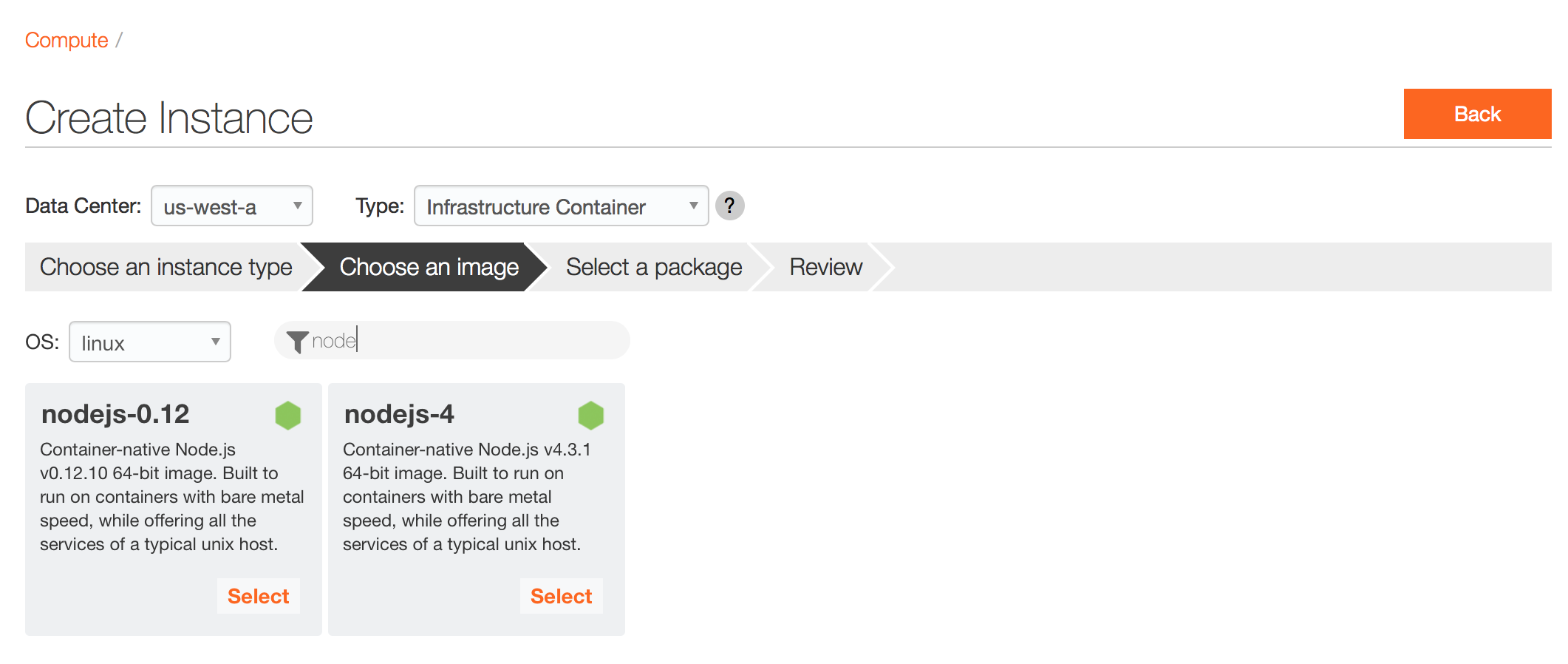
We're providing two Node.js images: nodejs-4 20160224 which comes with Node.js v.4.3.1 and nodejs-0.12 20160224 which comes with Node.js v0.12.10.
MongoDB
MongoDB is an open-source document database designed for ease of development and scaling.
The mongodb-3 20160218 image comes with MongoDB 3.2.1 pre-installed and you can to set the MongoDB admin password via the metadata key mongodb_password at provision.
PostgreSQL
PostgreSQL is an object-relational database management system (ORDBMS) with an emphasis on extensibility and standards-compliance.
The postgresql-9 20160218 image comes with PostgreSQL 9.5 pre-installed. Configuration settings like SHARED_BUFFERS, EFFECTIVE_CACHE_SIZE, CHECKPOINT_SEGMENTS, MAX_CONNECTIONS and `MAINTENANCE_WORK_MEM
are set to sane defaults based on the available RAM for your instance during first-boot. If you need
to overide the settings, you can and they will also be preserved during subsequent reboots. And you
to set the PostgreSQL password via the metadata key
pgsql_password` at provision.
Percona Server
Percona Server is a high-performance database server ideal for use anywhere you need MySQL.
The percona-5 20160218 image comes with Percona Percona 5.6.28-76 pre-installed. Configuration settings like INNODB_BUFFER_POOL_SIZE, MAX_CONNECTIONS, TABLE_CACHE and `THREAD_CACHE_SIZE
are set to sane defaults based on the available RAM for your instance during first-boot. You can
overide the settings if you based on your worn preferences and they will be preserved during
subsequent reboots. You can set the Percona password via the metadata key
percona_passwordat provision. And for clustering setups, you can also set theserver-idvia the metadata keymysql_server_id` on provision to prevent conflicts.
Debugging and introspection with the dtracetools-lx package
Also with this release we are including a beta of our new dtracetools-lx package. This is a package containing convenient DTrace scripts similar to the dtracetools package we provide in our SmartOS images. Within a running instance you can get a list of available dtrace scripts by typing dtrace- and then the TAB key. We've also made the source scripts available on GitHub.
Usage
Here's some example usage of the dtracetools scripts you might find useful.
Inspecting all files being opened with the dtrace-opensnoop script:
# dtrace-opensnoop -veSTRTIME                UID    PID COMM          FD ERR PATH2016 Mar  2
15:11:43     0  95358 mysql          3   0 /root/.mysql_history.TMP2016 Mar  2 15:11:47     0  96223
ls             3   0 /etc/ld.so.cache2016 Mar  2 15:11:47     0  96223 ls             3   0
/lib/x86_64-linux-gnu/libselinux.so.12016 Mar  2 15:11:47     0  96223 ls             3   0
/lib/x86_64-linux-gnu/libacl.so.12016 Mar  2 15:11:47     0  96223 ls             3   0
/lib/x86_64-linux-gnu/libc.so.62016 Mar  2 15:11:47     0  96223 ls             3   0
/lib/x86_64-linux-gnu/libpcre.so.32016 Mar  2 15:11:47     0  96223 ls             3   0
/lib/x86_64-linux-gnu/libdl.so.22016 Mar  2 15:11:47     0  96223 ls             3   0
/lib/x86_64-linux-gnu/libattr.so.12016 Mar  2 15:11:47     0  96223 ls             3   0
/proc/filesystems2016 Mar  2 15:11:47     0  96223 ls             3   0
/usr/lib/locale/locale-archive
Inspecting a mysql process showing "database not found" or "table not found" on queries with dtrace-opensnoop:
# dtrace-opensnoop -ve -p 93461STRTIME                UID    PID COMM          FD ERR PATH2016 Mar
2 15:06:20   103  93461 mysqld        -2   2 ./mysql/usue1.frm2016 Mar  2 15:06:43   103  93461
mysqld        -2   2 ./blah/database1.frm2016 Mar  2 15:06:51   103  93461 mysqld        -2   2
./blah/table1.frm
Trussing the ls command with dtrace-dtruss.d:
# dtrace-dtruss.d -a lsPID/LWP    RELATIVE  ELAPSD    CPU SYSCALL(args)                 = return
96287/1:      3581     154      4 brk(0x0)              = 6402912 0 96287/1:      3608       8
2 uname(0x7FFFFFEFF32A, 0x0, 0x7FFFFF4241C8)            = 0 0 96287/1:      3655      48     43
access(0x7FFFFF21C911, 0x0, 0x7FFFFF422E28)           = -2 Err#2 96287/1:      3669      14      9
mmap(0x0, 0x2000, 0x3)                = -16449536 0 96287/1:      3709      12      8
access(0x7FFFFF21F420, 0x4, 0x6)              = -2 Err#2 96287/1:      3730      16     11
open("/etc/ld.so.cache\0", 0x80000, 0x1)              = 3 0 96287/1:      3754      22     18
fstat(0x3, 0x7FFFFFEFED30, 0x7FFFFFEFED30)            = 0 0..
Show syscall counts by process with dtrace-syscallbyproc.d:
# dtrace-syscallbyproc.ddtrace: script '/usr/local/bin/dtrace-syscallbyproc.d' matched 676 probes^C
upstart-job                                                     177  cut
188  tr                                                              215  sshd
267  cat                                                             271  init
275  tail                                                            310  env
396  basename                                                        468  run-parts
495  initctl                                                         571  bash
736  service                                                         825  mysqladmin
1155  grep                                                           1935  ps
1967  mysqld                                                         1993  mysql
3615
Showing read/write counts by process with dtrace-rwbypid.d:
# dtrace-rwbypid.dTracing... Hit Ctrl-C to end.^C   PID CMD                       DIR    COUNT 97071
service                     R       25 97082 mysqladmin                  R       73 97092 mysqladmin
R       73 97107 mysqladmin                  R       73 97118 mysqladmin                  R       73
97084 mysqld                      R       99 97110 mysqld                      R       99 94509 bash
W      116 97098 mysql                       R      591 97071 mysql                       R      609
97101 mysql                       R 14753814 97076 mysql                       R 14762006
Provisioning instances
On the Joyent Public Cloud you can provision these new images via our customer portal:
-
From the Portal Dashboard, click on the orange Create Compute Instance button located in the grey Instances tile.
-
Select the Data Center of your choice from the drop down menu located underneath the title of the page.
-
Choose Infrastructure Container as your instance type:*
-
Select Linux as your OS
-
Now select either the
nodejs-4,nodejs-0.12,mongodb-3,postgresql-9or thepercona-5image. -
Select the package which corresponds to the desired memory, disk and CPU for your container. Then click the Next button located on the right side of the page.
-
Enter a name for the container (This is optional). Then click the Next button located on the right side of the page.
-
Provide your billing information if you have not done so already. Then click the Next button located on the right side of the page.
-
Create an SSH key or Import your public key if you have not done so already. Then click the Create Instance button.
And of course you can also provision instances of these new images via our new triton command line tool too!
For example, here's how to provision an 128MB instance based on our new nodejs-4 image with the name Node.js-4:
triton instance create --name=mynodejs-4-instance nodejs-4 t4-standard-128M
Importing images for use in private data centers running Triton
If you have a private data center implementation of Triton, you can find instructions on how to import these images here.
- Both Docker and infrastructure containers on Triton support your choice of Linux and SmartOS; hardware virtual machines also support Windows and FreeBSD. ↩